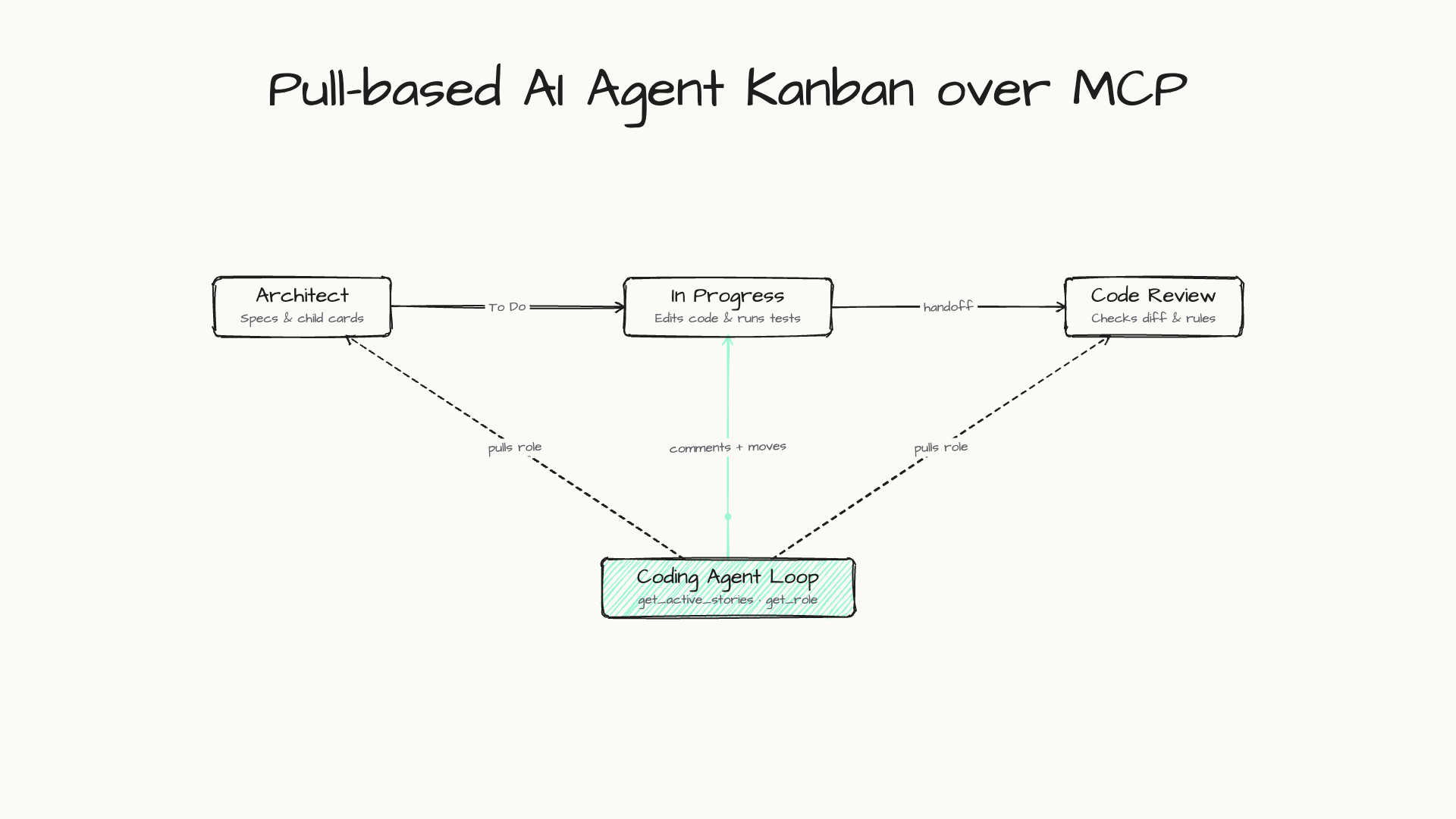
AI coding agents are very good at one task inside one chat. They are bad at remembering a backlog, at knowing who did what yesterday, and at telling you what is waiting for your decision. We kept losing that context between sessions, so we built an AI agent kanban board: a small, self-hosted kanban MCP server where every column is an agent role and our agents pull their work from the board.
This post walks through how it works: the stack, the data model, the MCP tools an agent calls, the loop that moves cards, a real feature walkthrough from our WiFi File Transfer monorepo, and what broke along the way. It is for developers who already use Claude Code, Cursor, Cline or OpenCode.
Why an AI agent kanban board beats a chat prompt
A chat thread is a poor place to keep work. The queue lives in your head, hand-offs between steps are buried in scrollback, and nothing records why a decision was made. A board keeps that state somewhere both you and the agent can see: every card has a column, a description and a running log of comments.
Agent work also moves backwards more often than human work does. A reviewer rejects an implementation, a test fails, a draft misses the brief. A board makes that loop visible instead of hiding it in a long conversation.
There are two broad ways to wire agents to a board. Some boards push: moving a card starts an agent run. Docker’s agent board, for example, sends the destination column’s prompt to the card’s agent when you move it forward. Ours pulls: the board is passive and the agent asks it for work over MCP. For task management across coding agents, pulling over MCP keeps the server tiny and lets any MCP client take part.
The stack: a self-hosted kanban MCP server in one container
The whole thing runs as one Docker container on port 8788:
- Hono on Node.js serves the REST API, the React board UI and the MCP endpoints.
- SQLite (better-sqlite3 in WAL mode) stores projects, columns, cards and roles in a single file on a mounted volume. Numbered SQL migrations in
/migrationsare applied in order on boot and recorded in a_migrationstable. - MCP transports: Streamable HTTP at
/mcp, the older HTTP+SSE transport at/ssefor clients that have not moved on yet, and stdio throughdocker execfor clients that prefer to launch a process.
The current MCP specification defines stdio and Streamable HTTP as the standard transports. The old HTTP+SSE transport has been deprecated since the 2025-03-26 revision, so we keep /sse only for older clients.
Connecting a client is one entry in its MCP config. In Cursor’s mcp.json it looks like this:
{
  "mcpServers": {
    "kanban": { "url": "http://localhost:8788/mcp" }
  }
}
Claude Code needs "type": "http" added to the same entry, or you can run claude mcp add --transport http kanban http://localhost:8788/mcp. Either way, Claude Code gets a task board it can read and update.
Columns are agent roles
The idea that made the board useful: a column is a role. Each column has a role_id that points at a row in a roles table, and each role has a system prompt. Where a card sits decides who works on it next.
CREATE TABLE IF NOT EXISTS roles (
  id TEXT PRIMARY KEY,
  name TEXT NOT NULL,
  system_prompt TEXT NOT NULL,
  created_at DATETIME DEFAULT CURRENT_TIMESTAMP
);

ALTER TABLE columns ADD COLUMN role_id TEXT;
A new code project gets nine columns, each with its own role:
| # | Column | Role that works cards in it |
|---|---|---|
| 1 | Analysis | Researcher / Analyst |
| 2 | Architect | Architect |
| 3 | Planned | Project Owner |
| 4 | To Do | Tech Lead |
| 5 | In Progress | Software Engineer |
| 6 | Code Review | Code Reviewer |
| 7 | Test | QA / Tester |
| 8 | Done | Release Manager |
| 9 | Archived | Archivist |
That gives you a multi-agent kanban pipeline without running nine different agents. Roles are data, not code: edit a prompt in the board UI and the next run behaves differently. That makes the prompts themselves the main thing to get right. Our guide to writing better AI prompts covers the same habits we use for role prompts: be specific about the goal, the inputs and what “done” looks like.
The MCP tools an agent calls
How do you build an AI agent task queue? In our case it is a handful of deliberately boring MCP tools:
| MCP tool | What it does for the agent |
|---|---|
list_projects |
Lists projects and their local paths |
get_active_stories |
Returns the board’s cards, its columns with their roles, and the project’s local folder (Done and Archived cards are left out) |
get_role |
Returns the system prompt for a column’s role |
add_story_comment |
Appends to the agent’s work log on the card |
update_story_column |
Moves the card |
create_story, update_story |
Add and edit cards |
Here is the core of get_active_stories, trimmed. Because the server wraps better-sqlite3 in a thin D1-compatible query adapter (.prepare().bind().all()), the MCP handlers keep D1’s async call shape:
server.tool(
  'get_active_stories',
  'Get active stories and local path for a project',
  { project_id: z.string() },
  async ({ project_id }) => {
    const { results: stories } = await db.prepare(
      `SELECT s.* FROM stories s JOIN columns c ON s.column_id = c.id
       WHERE s.project_id = ? AND c.name NOT IN ('Done', 'Archived')`
    ).bind(project_id).all();
    // ...also returns the board's columns (with role_id) and local_path
  }
);
The board never edits code. The agent’s own file and shell tools do the real work in the project folder; the board only tells it what to work on and records what happened.
One loop, many roles
We do not run an orchestrator or one agent per role. Instead, a scheduled run launches a coding agent with a reusable board skill (naming the project) so one card advances per run:
- Call
get_active_storiesfor the project (after resolving its ID withlist_projects). - Pick one card. We take the card furthest along the board, so work in flight finishes before new work starts.
- Call
get_rolefor that card’s column and adopt the prompt. - Do the work in the project’s local folder.
- Post a comment with a short summary of what changed.
- Move the card to the next column.
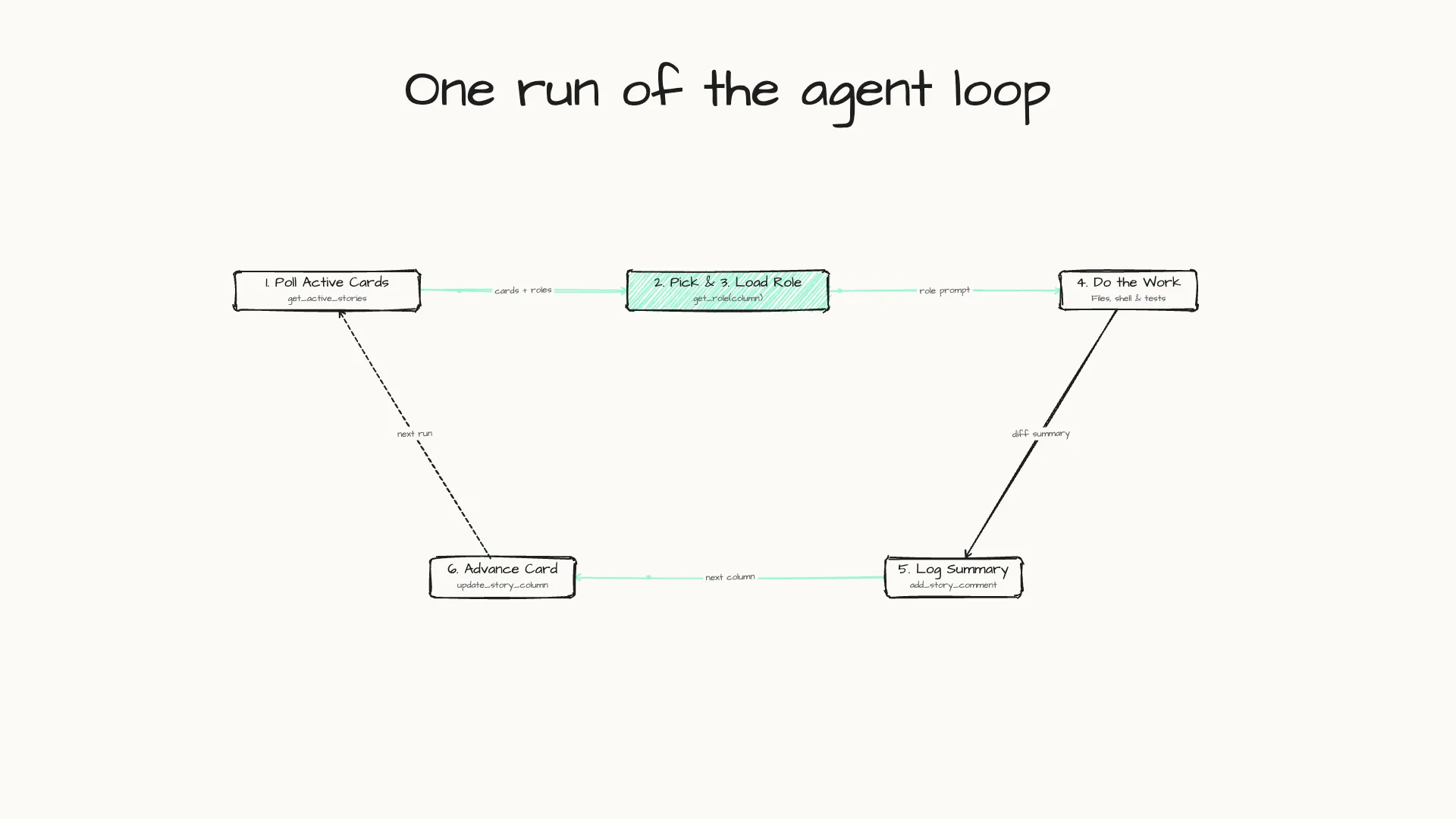
Then the run ends, and the next run starts from wherever the board now is. Because roles live in the database, adding a stage means adding a column and a prompt. There is no new agent to configure, no new schedule and no new code.
A real feature through the loop: scoped storage in File Transfer
To see what that loop looks like on real software work, take a feature card from our File Transfer Flutter monorepo (filetransfer_flutter): bringing Android 11+ scoped storage from the Pro app to the Free edition.
The starting card had a single two-sentence description: the Pro version already let users pick a folder with scoped storage instead of requesting broad storage access, and the Free app needed the same option. As the card moved across columns, each role did one bounded job:
| Stage | Role | Action taken via MCP + local repo |
|---|---|---|
| Architect | Architect | Checked package dependencies, saw apps/free cannot import packages/filetransfer_pro_features, and designed moving StorageAccessModeTile and MountRootDriveTile into filetransfer_shared |
| Planned / To Do | Project Owner / Tech Lead | Used create_story to split the design into 4 scoped child cards (move tiles to shared, update Pro imports, register in Free settings, update onboarding_screen.dart) |
| In Progress | Software Engineer | Picked each child card in turn, refactored the Dart packages and onboarding validation, ran flutter analyze, and logged the changes with add_story_comment |
| Code Review | Code Reviewer | Verified monorepo boundaries and clean flutter analyze output before advancing the cards to Done |
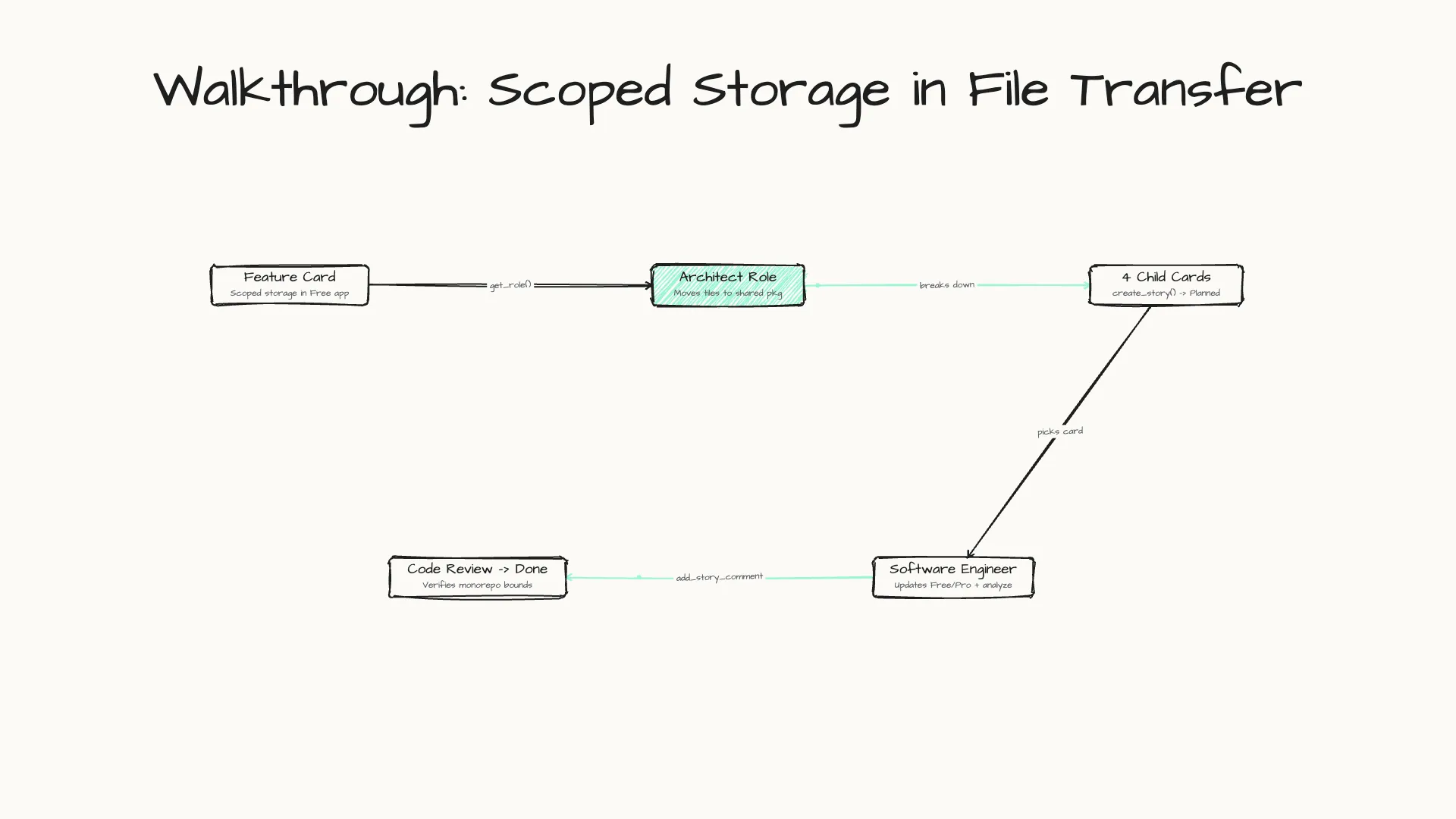
Splitting one broad feature request into four small cards meant no single agent run had to hold the entire monorepo refactor in context at once, and every architectural trade-off stayed attached to the parent card’s comment log.
Rework, Blocked and the human gate
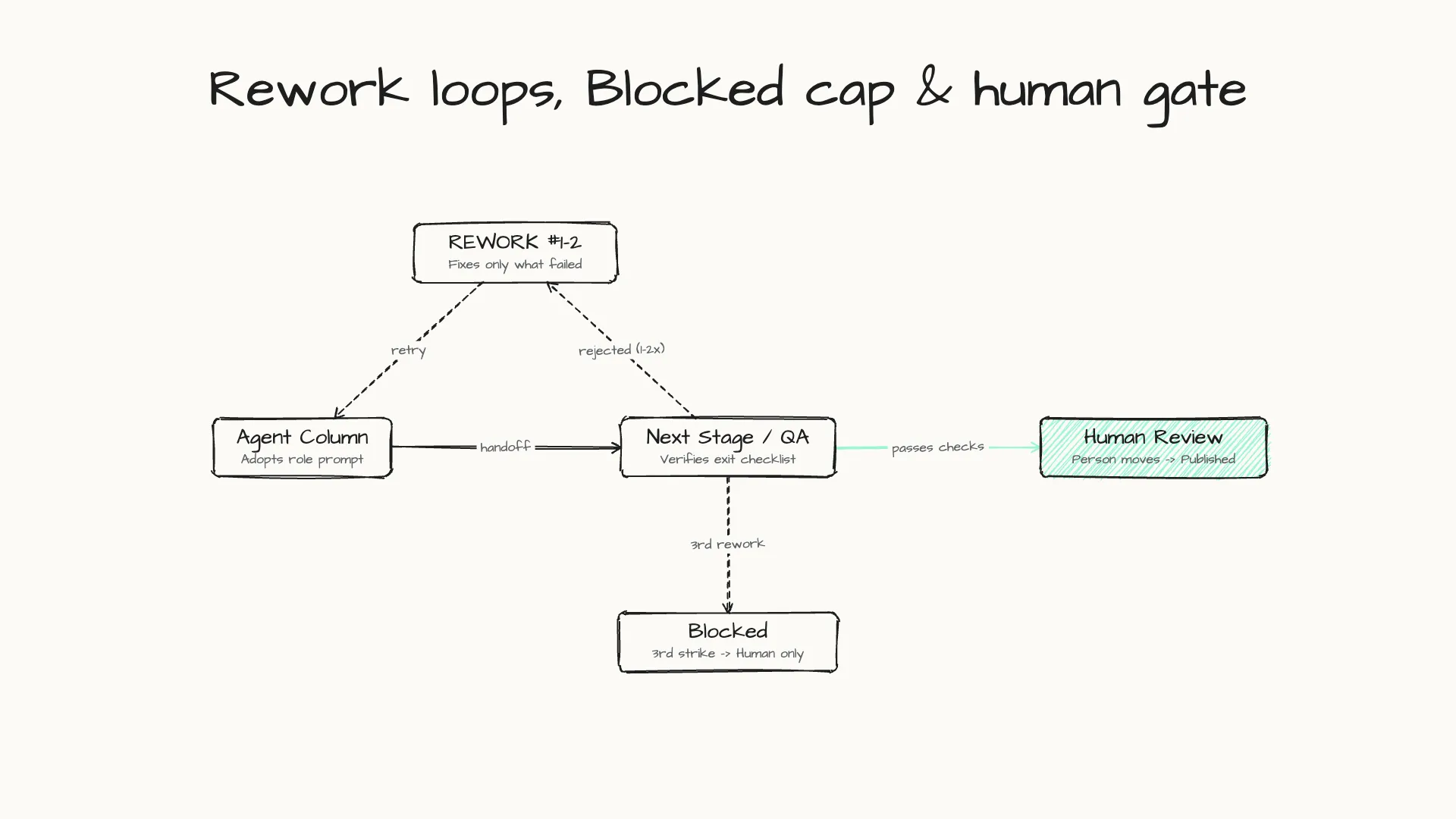
A pipeline that only moves forward hides its problems. When a later stage rejects work, it sends the card back with a comment that starts REWORK #n -> <Column> and says exactly what to fix. The receiving role reads those comments first and fixes only what was criticised.
When should a task be escalated instead of revised? Our rule is mechanical: if a card would be sent back to the same column a third time, it goes to a Blocked column instead, with a note explaining what a human needs to decide. Agents never move cards out of Blocked.
The same applies to final approval. On our pipelines, only a person moves a card out of the review column, and an agent never approves its own work. This human-in-the-loop AI agent workflow adds a manual step per card, and that step is where confident but wrong output gets caught before it ships. It is the practical version of the governance concerns we wrote about in AI agents in 2026.
Beyond code: swapping the column template
Because columns and roles are just rows in SQLite, the board is not tied to software repositories. We added a kind field on projects so a board can load different column templates—for example, a code workflow with engineering and QA stages, or a multi-stage content pipeline with research, drafting, SEO and fact-checking columns. Each stage still reads the project’s local folder, writes its output, leaves a comment and moves the card on.
What broke, and what we’d do differently
The first version ran on Cloudflare Workers with D1. MCP clients kept failing with “Invalid or missing session ID” because the worker isolates holding session state were recycled between requests. Moving to a single long-running Node container, with sessions recreated on demand when a client reconnects, fixed it. Newer Streamable HTTP revisions in the 2026-07-28 MCP spec move away from protocol-level sessions, which also removes this class of statefulness issue for clients that adopt it.
Two more lessons:
- Conventions need checking. Rework is counted from comments. A malformed comment quietly resets the count, so the loop double-checks before moving a card back.
- Local does not mean safe. Our server has no authentication by design, because it is meant for localhost. The MCP specification says servers must validate the
Originheader, and that local servers should bind to 127.0.0.1 and use authentication, to prevent DNS rebinding attacks. Our container still publishes its port on all interfaces and accepts any origin. If you build something similar, bind it to localhost and never expose it to a network.
Start with three columns
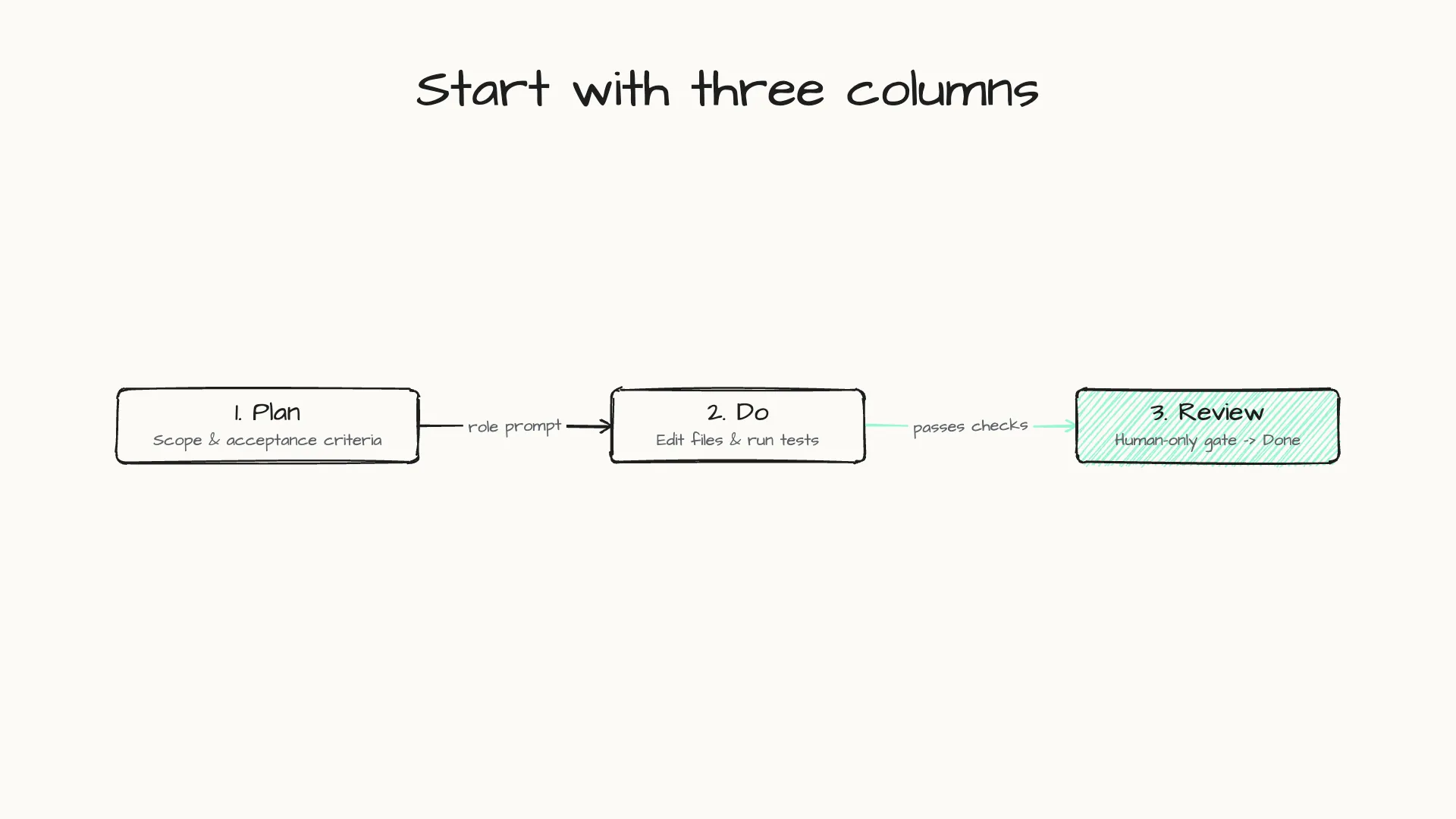
You do not need nine or ten columns to get value from this. Start with three: Plan, Do and Review. Give each column a role prompt, connect your agent over MCP, and make Review a column only you can move cards out of. Add stages when a single prompt starts doing too many jobs.
If you want to see the other developer and productivity tools we ship, take a look at our products page.
This post was drafted with AI assistance, then reviewed and fact-checked by techprd.